Context
At Smartsheet, most accessibility issues were discovered in vendor accessibility audits of the product that was already in production. By the time a problem showed up in an audit, it was already affecting users.
I sat on the design system team while the company was in the middle of a full overhaul of its product interface. Everything the design system shipped flowed into every product, so changing how the design system handled accessibility was the most direct way to change accessibility across all of them.
The challenge
Late discovery was only half the problem. When fixes were made, they were implemented inconsistently, even across components that looked and behaved alike. The same issue could be fixed one way in one product area and another way, or not at all, in the next. Without a shared standard between design and engineering, every fix was a one-off.
Nobody had a clear picture of where things stood, either: not for the organisation, and not for the people using the product with assistive technology.
What I did
- Established a baseline from three sources: an organisation-wide survey, usability testing of core workflows with screen reader users, and the W3C Accessibility Maturity Model.
- Built a design-to-code framework so accessibility was specified in design and checked in review, before anything was built.
- Added automated accessibility checks to the engineering pipeline and the design system.
- Planned and oversaw the rollout of a cross-functional, role-specific accessibility training program across design and engineering.
- Made the case to invest in accessible foundations for the new product interface, instead of patching the existing one.
- Worked with product teams to build an accessibility roadmap, reported weekly to executives, and established an annual cadence of third-party audits to measure progress.
How the program ran
I worked closely with a UX designer, two design technologists and three front-end engineers, and rolled the framework out across eight product teams.
I reported weekly to C-suite executives and to engineering and design leadership on progress and risks. To make that reporting concrete, I created and maintained executive dashboards that tracked accessibility issues for each product by count and severity, alongside compliance progress, product readiness and each team’s remediation plan.
Outside the company, I met with enterprise and public-sector customers, alongside product managers, to review their accessibility requirements and show our progress through demos and our product and UX strategy. Many of them regularly evaluated their third-party tools against the needs of their own employees and customers.
Starting from evidence
What the organisation told us. Before deciding what to build, I sent an organisation-wide survey to assess the status quo and ask what people saw as the most important next steps for accessibility.
What users showed us. We tested Smartsheet’s core workflows, chosen with a jobs-to-be-done framework, with seven participants who used JAWS, NVDA and VoiceOver on macOS. A UX designer moderated the sessions. I helped write the scripts, refined the study between sessions, and pulled out the key findings. We mapped each workflow step by step and marked where people using assistive technology hit a blocker:
Text description: Core user workflows mapped step by step
-
Plan a project
- Start from template or blank sheet
- Define columns (blocker)
- Enter and indent tasks into phases (blocker)
- Assign owners, review Gantt view (blocker)
- Set baseline and share
-
Collect and triage requests
- Set up intake sheet (blocker)
- Create form, map fields (blocker)
- Add required fields and logic (blocker)
- Share or embed the form
- Triage rows: owner, priority, status (blocker)
-
Automate handoffs and approvals
- Identify the repetitive step
- Choose a trigger (blocker)
- Add conditions (blocker)
- Set action and recipients (blocker)
- Monitor and adjust
-
Report status
- Pick audience and KPIs
- Build cross-sheet report (blocker)
- Add filters, groups, summaries (blocker)
- Build dashboard (blocker)
- Share or publish
- Schedule email delivery (optional)
-
Track my work
- Get notification or update request
- Open “assigned to me” or reply via email or mobile
- Review due dates and priorities (blocker)
- Update status, % complete, dates (blocker)
- Comment on blockers
- Mark complete (blocker)
-
Collaborate in context
- Open the row or item (blocker)
- Comment and @mention (blocker)
- Attach or link files (blocker)
- Proof visual assets (plan-dependent) (blocker)
- Resolve the thread
- Update the row (blocker)
The product was far less accessible than we had guessed, particularly for blind users. Critical issues early in a workflow could stop a session before participants reached the rest of it, so a standard task-based script couldn’t test the full workflow. We changed the format: sessions became far more interactive, so we could help participants past a blocking issue and still learn about the rest of the workflow, and we told participants up front about the challenges they were likely to meet.
Where we stood, and where to go. I used the W3C Accessibility Maturity Model to turn all of this into priorities: which core capabilities we needed, including role-specific training, and what resources and documentation had to exist to support them. Mapped against the model, the organisation was at the early end in the dimensions that mattered most: the need was recognised, but activity was ad hoc.
Design to code
The framework connected what designers specified with what engineers built:
- Annotated design specs: the UX designer I worked with designed and published an accessibility annotation library, so designers could hand off detailed specs for keyboard navigation, ARIA labels, heading levels, reading order and landmark regions.
- Accessible component patterns: shared patterns in the design system, so teams reused accessible components instead of rebuilding them.
- Definition of done: accessibility acceptance criteria, so “done” included accessibility.
- Design review checkpoints: a checklist used in design reviews, so accessibility came up before implementation, not after.
- Documentation and training: guidance for designers and engineers on using the patterns and the checklist, backed by role-specific training across design and engineering that I planned and oversaw the rollout of.
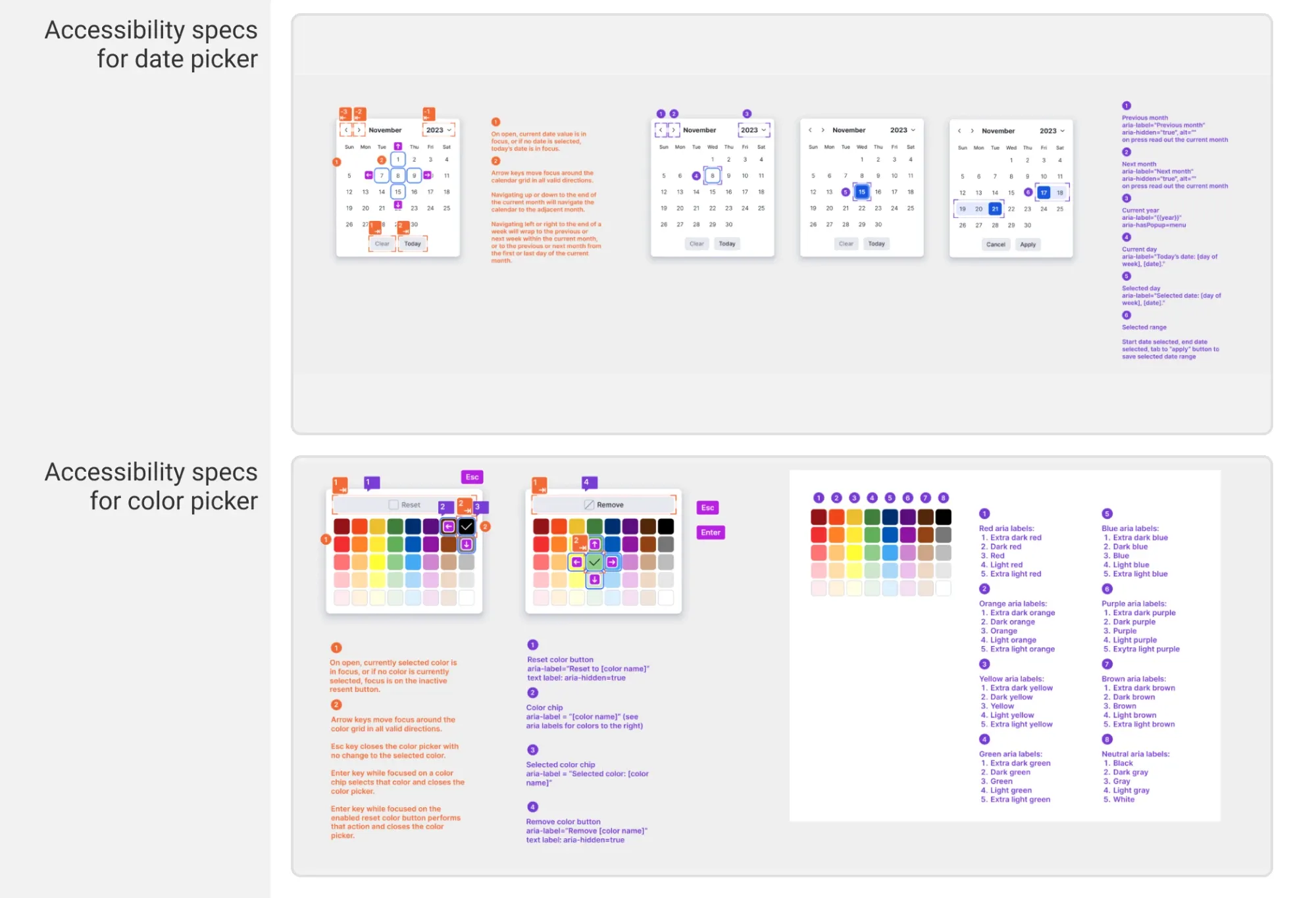
Specs made problems concrete before code was written. In the Dashboards product, for example, the screen reader reading order followed the order in which builders had added widgets, not the order they appeared on the page. Specifying reading order fixed that at the source. Tagging key areas of the interface as landmark regions also made skip links possible, a shortcut for screen reader users and people with motor impairments.
Reviews, office hours and a community of practice
Specs only help if someone checks them. With the UX designer, I set up self-serve office hours where designers could book time to review their accessibility specs before handing them to engineering, or bring their engineering partners to review features in progress. Designers could also tag the UX designer in their Figma files for an asynchronous review, with feedback left directly in the design.
We also moved questions out of private messages and into shared “Ask us” Slack channels, where hundreds of designers and engineers asked and answered accessibility questions. Every answered question became a shared answer, which made solutions more consistent across teams.
Automated checks
We added axe-core checks to the GitLab pipelines and to Storybook, where the design system’s components were built and reviewed, alongside ESLint.
Failures produced warnings rather than blocking merges, on purpose. The goal at first was awareness and adoption across teams. Blocking builds on day one would have turned the checks into an obstacle. The plan was to move critical issues to failing the build once teams had adopted them.
A hard decision: patch the old UI, or build accessible foundations?
We could fix issues in the existing interface right away, or push for foundational changes in the new product interface that was being designed. I chose the foundations. It meant waiting longer for some fixes, but it let us rebuild the interface of Smartsheet’s flagship product to be accessible from the ground up.
Where it moved the organisation
The work aimed to move each priority dimension to Integrate, where the approach is defined, organised and backed by a roadmap.
ICT Development Life Cycle: from Launch to Integrate. Accessibility was checked, but only by vendor audits after release, and fixes varied from one component to the next. I moved it into the life cycle: annotated specs, accessible design-system components, a definition of done, design review checkpoints, and automated checks in the pipeline.
Knowledge and Skills: from Inactive or Launch to Integrate. Teams kept producing the same issues and fixing them inconsistently, a sign there was no shared, role-specific knowledge. I planned and rolled out role-specific training across design and engineering, with documentation and resources for each role.
Oversight and Culture: from Launch to Integrate. Audits happened, but they weren’t connected to a plan, and there was no baseline. The survey and the usability study gave us the baseline. Weekly reporting to executives, backed by an issue dashboard for every product, kept progress and risks visible. I worked with product teams to build an accessibility roadmap, and set up an annual cadence of third-party audits so progress was measured, not assumed.
We didn’t reach Optimize, where the approach is consistently evaluated across the whole organisation and assessment results drive action. The automated checks were still warning-only, with critical issues planned to fail the build, and the annual audits were the start of that feedback loop, not the finished version.
Impact
- Significantly fewer accessibility issues reached production, as reflected in the annual third-party audits.
- The program published an expanded VPAT (Voluntary Product Accessibility Template) covering 21 Smartsheet product areas, plus a separate one for Resource Management.
- Accessibility moved from ad hoc to organised: a baseline, a roadmap with product teams, weekly executive visibility, and a regular audit cadence to measure progress.
- The usability studies built empathy and awareness among product leaders, who went on to champion accessibility in their own areas.
- The usability study gave the team an honest picture of the product for screen reader users, and the design checklists and annotations brought accessibility into conversations before implementation, which resulted in a far more accessible component library.
What I’d do differently
Design the research for the product as it is, from the start. When you test with blind users on a product known to have serious accessibility issues, a standard usability script breaks down. Something that’s an annoyance for a sighted user can be a hard stop for a blind user. Those blockers were valuable findings, but they also hid every issue further along the workflow. We adapted partway through. Next time I’d make the sessions conversational from the first one, with room for the moderator to step in, so every session covers the whole workflow.
Start training and community-building sooner. Training, office hours and the “Ask us” channels are what made accessibility stick across teams. They do the most good before teams form habits, so I’d start them as early as possible, alongside the baseline work rather than after it.
Further reading
- Updates from our Accessibility Program and how we’re continuing to build more inclusive software (Smartsheet, 2022). An update I wrote for Smartsheet on the program’s research, automated testing, external audits and VPATs.