Context
As an accessibility program manager, my job was to make sure accessibility was part of how the whole business worked: design and engineering, sales and marketing, editorial, digital production, legal and customer support. Doing that meant knowing who did what, and who to bring into a decision.
The company had no org chart. That was deliberate: the policy was not to publish one, so as not to overemphasise hierarchy. I had never worked anywhere without one.
The challenge
When I talked to colleagues, many felt the same gap. A conversation with a colleague in the company’s diversity, equity, inclusion and accessibility (DEIA) employee group changed how I saw it. Without an org chart, people joining the company had no way to see the social and political dynamics that shape how decisions get made. A policy meant to play down hierarchy was making the existing structure harder for newcomers to read.
So the problem was more than missing information:
- A conventional chart was the thing the policy rejected. A tree of boxes with the chief executive at the top is exactly the picture of hierarchy the company wanted to avoid.
- The organisation was large. With more than 600 employees, showing everyone at once would overwhelm people, so the design had to manage how much someone takes in at a time.
- Org charts are usually inaccessible. They tend to be images or diagrams that a screen reader can’t read and that are hard to use with a keyboard or when zoomed in.
What I did
- Listened to colleagues across the business about what they needed to understand, and why.
- Built on a colleague’s proposal to leadership: a spiral, as an alternative to a top-down chart.
- Prototyped two radial designs in D3.js: a sunburst, and a collapsible dendrogram (a tree diagram you can expand and collapse).
- Designed for progressive disclosure, so people see a few levels at a time and choose where to go deeper.
- Designed for flexibility: several ways into the same information, so people choose the path that suits them.
How the work ran
This was a side project: a passion project I took on at Norton in 2025, alongside my role. It wasn’t part of anyone’s plan, so the prototypes had to make the case themselves.
I shared them with several colleagues first, then presented them to the DEIA employee group, and then to C-suite executives. By then I was showing two directions side by side: the sunburst, and the collapsible dendrogram.
A circle instead of a ladder
A colleague had already proposed a spiral to leadership as an alternative to a conventional org chart, and it seemed promising. I brought my background in data visualisation and the technical side of accessibility to it, and built two prototypes.
A radial layout starts from the centre and works outwards. Teams are slices, and the size of each slice shows how many people are in that part of the organisation. Nobody sits at the top of a page. The structure is still there, but it reads as how the company fits together rather than who ranks above whom.
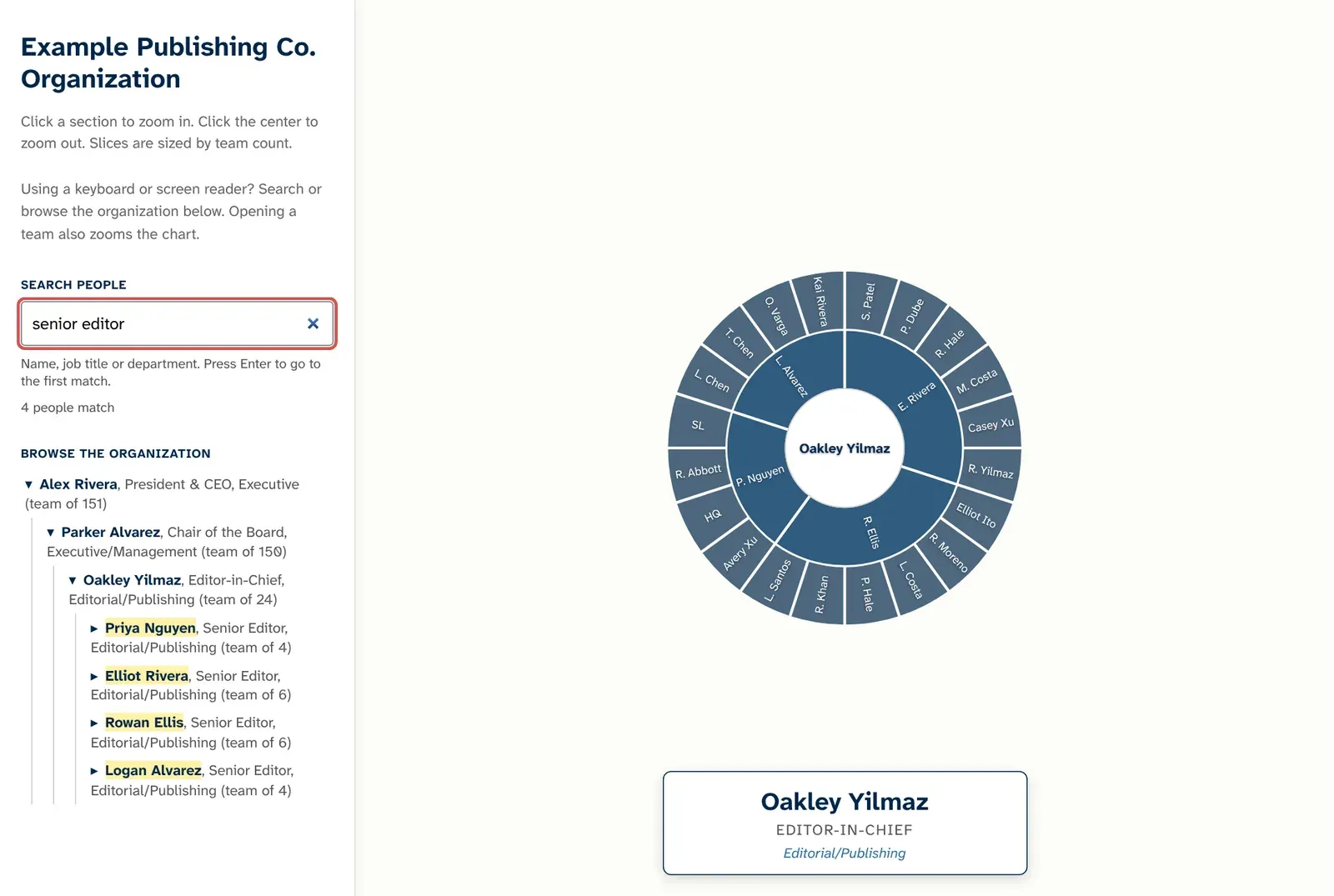
Try the prototype. It opens a full-page demo built on synthetic data.
Showing less, on purpose
People liked both the sunburst and the dendrogram, but the sunburst’s visual simplicity and elegance won out. It also handles complexity well. Instead of showing every person at once, it shows a few rings from wherever you are. Choosing a team zooms in so that team fills the circle, and choosing the centre zooms back out.
That keeps the amount on screen manageable. People can follow one branch of the company at a time instead of scanning a wall of names, which lowers the cognitive load of a large organisation. It also puts the reader in control of how deep to go. Doug Schepers writes about designing data for cognitive load in the Urban Institute’s accessibility guide to data visualisation (see Further reading).
Flexibility as an accessibility principle
One idea ran through the whole project: flexibility is an accessibility principle. People take in information in different ways, so a visualisation shouldn’t prescribe a single path through it. It should give people autonomy in how they interact with the data, and the design has to build that choice in from the start.
The org chart offers several paths to the same information:
- Explore the chart. Click a team to zoom in, and the centre to zoom back out.
- Browse the list. Open and close teams in a structured list, with a keyboard, a screen reader or a mouse.
- Search. Find people by name, job title or department.
The paths stay in step. Opening a team in the list zooms the chart, and clicking the chart opens the team in the list, so people can switch between them whenever they like.
Making it work without a mouse
An org chart is no use if it only works for people who can see it and use a mouse, so accessibility was part of the design from the start. The sunburst had a menu that jumped straight to a person, and the same structure was available as a list.
My first versions made every person in the chart a separate Tab stop: 152 in the sunburst. That met the letter of keyboard access but not its spirit, because a keyboard user would have to press Tab up to 152 times to get past the chart. I reworked it:
- The list is the way in. A “Browse the organization” list sits beside the chart. Each manager is a button that opens or closes their team, and teams start collapsed, so there are 3 Tab stops when the page loads.
- The list and the chart move together. Opening a team in the list zooms the chart to it, and clicking a slice opens that team in the list.
- The chart is visual only. Screen readers skip the chart and get everything from the list, which uses standard buttons and lists that every screen reader already knows how to handle.
- Search finds people by more than their name. The old menu could only jump to names by their first letters. A search box now filters the list to people whose name, job title or department matches what’s typed, keeps their managers in view for context, and tells screen reader users how many people match. Enter goes to the first match and zooms the chart to them.
I tested it myself with a screen reader and with a keyboard alone, alongside automated checks with axe. That’s a first pass, not proof that it works for the people who depend on it.
Impact
- The idea won. After presentations to colleagues, the DEIA employee group and C-suite executives, the case for showing how the company is organised was accepted, with the sunburst as the design.
- What remains is the data. No team owns an up-to-date record of who reports to whom, because keeping one has never been required. HR is the likely owner, but the data is sensitive, so privacy has to be worked through before anything is built on it.
- Next step: testing with more assistive technology users. My own testing can’t stand in for people who rely on assistive technology every day, such as screen readers, magnification or voice control, so the next round is to have more of them try it.
Reflection
Some constraints are philosophical, not technical. Building an accessible chart was the easy part. The real constraint was a deliberate policy, held for a reason: not overemphasising hierarchy. Minds like that take time to change. Rather than argue against the principle, it was more useful to look for a creative answer that respected it, like a circle instead of a ladder.
Rapid prototyping turns resistant stakeholders into design partners. A working prototype lets people grasp an idea instead of imagining it. When stakeholders can see and use the design, they can react to something real and iterate on it with you, instead of judging a proposal from a distance.
Further reading
- Do No Harm Guide: Centering Accessibility in Data Visualization (Urban Institute, 2022), edited by Jonathan Schwabish, Sue Popkin and Alice Feng. Chapter three, “Designing Data for Cognitive Load”, is by Doug Schepers.